A year and a half ago I went on a wall wart power measuring exercise. I concluded that going around unplugging wall warts (8 lbs CO2/yr) wasn’t going to save the planet. If you want to save the planet, you’ll have to do hard things, like hang your clothes out on the line (.3 tons CO2/yr), drive your car half as much (3 tons CO2/yr), or turn off your geeky home server (.3 ton CO2/yr).
For me, saving energy is nothing new. We grew up getting yelled at for leaving the fridge door open, we set our thermostat back before set-back thermostats were fashionable, and in winter we left the water in the bath tub until it had cooled so the heat from the tub water would warm the house instead of the drain (I ain’t paying to heat the $#*&$^ drain!). My dad super-insulated our house before the 1973 oil crisis. We weren’t saving energy to be green though, we were just cheap.
Showing posts with label green. Show all posts
Showing posts with label green. Show all posts
Home Server Energy Consumption
I'm moving toward 'less is more', where 'less' is measured in watts. Right now my entire home entertainment and technology stack uses about 150 watts total (server + network + storage + Sun Rays + laptops + wall warts). I no longer use the stereo or television - that stack is unplugged and consuming zero energy, and I don’t have any watt sucking game consoles. My next iteration of home entertainment & technology should use about 25 watts for all servers and storage and about 20 watts for each user end point (laptop). The server and network should be the only devices that run continuously. End points should suspend and resume quickly and reliably so that no more than one is normally running at a time, so the net of all server, network and user devices should be under 50 watts.
Performance Benchmarks that Include Energy Efficiency Data
Signs of the times:
Energy Benchmarking: Rich Miller at Datacenter Knowledge is reporting that TPC will update their performance benchmarks to include energy efficiency data. In the future, they’ll measure performance, price and energy in their benchmarks.
Actual datacenter energy costs (rather than power supply nameplate ratings) are hard to generalize. The numbers that I can find are all over the map. Energy use depends on server load, server configuration, server efficiency, power distribution efficiency and cooling efficiency, none of which are easily calculated and rarely measured. As a rough estimate, it looks like for small servers the cost of power + cooling approaches the cost of purchasing the server hardware and amortizing it over 4 years. Figuring energy use into the price/performance calculations for systems should skew future purchases toward efficiency.
Power Calculators: HP has a rack power calculator tool that provides useful estimates of power use for a given HP server and rack configuration. APC and others provide similar tools. I’m sure they build the tools to help figure per-rack UPS, power and cooling for custom rack configurations, but the tools can easily be used to help estimate energy costs.
Don’t forget cooling: One thing I’ve noticed is that people tend to forget that for every watt of electricity that their systems use, they’ll have more than one watt of cooling that they need to supply to remove the heat from the datacenter (or their house if they have air conditioning). The process of removing the watt of energy from the room is not 100% efficient. For example, if I have a rack that uses 5000 watts, a cooling system that was 100% efficient would use an additional 5000 watts to remove the heat from the room. But cooling systems are not 100% efficient. Worst case, you might spend up to an additional 10,000 watts of energy to cool the 5000 watt server rack.
The Power Consumption of Home Electronics
I learned something last week. Xbox and PlayStation Game consoles are pathetically bad at energy consumption. The Wii doesn’t suck (power) quite as badly.
The Data:
The Natural Resources Defense Council did an interesting study[1] of game consoles and attempted to estimate annual energy usage and cost.
The good part:

Ouch. Unlike half watt wall warts, a hundred and some odd watts might actually show up on your monthly electric bill. And from what NRDC can tell, the game consoles are not real good at powering themselves off when unused, which makes the problem worse.
This is really discouraging. The idea that energy consuming devices should automatically drop themselves down into a low-power state when idle isn’t new, yet we continue to build (and buy) devices with poor power management. I suspect that part of the problem is that there isn’t sufficient information available to consumers at the time of purchase to make a rational ‘green’ decision. Unlike refrigerators, clothes washers, and automobiles (here in the USA), energy consumption isn’t part of the marketing propaganda of most home electronics.
It should be.
Someday smart retailers will figure out how to market energy costs on home electronics, much like they already do for large home appliances. For my last clothes washer/dryer (tumbler, to those on the wrong side of the pond) the sales dude tried to push me up to a higher cost model based on features. When I explained that for clothing related appliances, my feature requirements were a step above a rock in a river, he wisely and quickly pointed me to an expensive but efficient washer & dryer model.
Sold.
As for the report as a whole, I’m skeptical of the annual gross energy costs and savings shown in the report, mostly because the estimates are highly dependent on user actions. I suspect that we really don’t know how many game consoles are left on continuously versus powered down after each use, and more importantly, the NRDC doesn’t consider the cost of cooling the heat generated by the consoles in those parts of the country where air conditioning normally is used.
So if you are like my neighbors and you leave your air conditioner running all summer, your summertime gaming costs will be much higher. The hundred plus watts of heat needs more than a hundred plus watts of cooling. But if like me, you live in a climate where heating is the norm for more than half the year, the waste heat generated by the console gets subtracted from the heat that your furnace needs to supply, making the cost of gaming somewhat less.
In any case, don’t sweat the wall warts. Look around for things that suck up a hundred or more watts and unplug those.
12/17/2010: Scientific American published a similar article.
[1]Lowering the Cost of Play, Natural Resources Defense Council
Missing the Point
ExtremeTech reviewed the new Fit-PC Slim.
Conclusion:
CompuLabs really needs to step up to a more modern platform if it wants to stay competitive in the rapidly growing market for small, net-top PCs.
They missed the point. It's not a "net-top" or desktop replacement, it's an extremely low wattage home server.
The spec that matters:
Power consumption: 4-6W
Compare that to the 50-100w of typical desktops that are used as home servers & left running 24 hours per day, or the 20+ watts of a typical notebook. Even an Eee PC uses 15 watts.
If what you need is a home server to use as a samba share, a web server or similar always-on device, a 5 watt brick looks pretty interesting. That's 500kwh/yr less power, 400kg less CO2, and $50 less on your electric bill per year than the old desktop-turned-server that you have stuffed under your desk.
And don't whine about the 500mhz processor and 500mb RAM. We ran LAMP stacks that served up more users than your house ever will on a quarter of that.
Unplug Your Wall Warts and Save the Planet?
Do wall warts matter?
(09/29-2008 - Updated to correct minor grammatical errors. )
Let's try something unique. I’ll use actual data to see if we can save the planet by unplugging wall transformers.
Step one – Measure wall wart power utilization.
Remember that Volts x Amps = Watts, and Watts are what we care about. Your power company charges you for kilowatt-hours. (One thousand watts for one hour is a kWh).
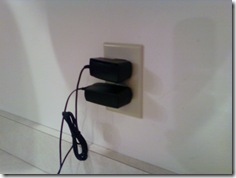
 Start with one clamp-on AC ammeter, one line splitter with a 10x loop (the meter measures 10x actual current) and one wall wart (a standard Nokia charger for an N800).
And we have zero amps on the meter.
OK - That meter is made for measuring big things, so maybe I need a different meter.
Try again - this time with an in-line multimeter with a 300mA range.

Children - don't try this at home - unless you are holding on to your kid brother and he is properly grounded to a water pipe.
(just kidding.....)
That's better. It looks like we have a couple milliamps current draw.
Try a few more. The ones I have (Motorola, Samsung, Nokia) are all pretty close to the same. Lets use a high estimate of 5mA @ 120v, or about a half of a watt.
Similarity, checking various other parasitic transformers, like notebook computer power bricks, yields currents in the low milliamp ranges. When converted to watts, the power draw for each brick is somewhere between one-half and two watts.
To make sure the numbers are rational and that I didn't make a major error somewhere, I did the simplest check of all. I placed my hand on the power bricks. When they are plugged into the wall and nothing is plugged into them, they are not warm. (Warm = watts).
One more sanity check. Plugging three notebook power supplies and three phone power supplies into a power strip shows about 30mA @ 120v for all six bricks, which is under 4 watts, or less than a watt each. My measurements are rough (I don't have a proper milliamp meter), but for estimates for a blog that nobody actually reads, they should be close enough.
So let's pretend that I want to save the planet, and that unplugging power bricks is the way I'm going to do it. I'll need to periodically plug them in to charge whatever they are supposed to charge. Let's assume they'll be plugged in for 4 hours per day and unplugged 20 hours per day. If I have a half dozen power bricks, I'll save around 5 watts x 20 hours = 100 watt-hours per day, or the amount of electricity that one bright light bulb uses in one hour. That would add up to 35kWh (Kilowatt-hours) per year. Not bad, right?
Until you put it into perspective.
Perspective
Let's take the other end of the home appliance spectrum. The clothes dryer (clothes tumbler to those on the damp side of the pond). That one is a bit harder to measure. The easiest way is to open up the circuit breaker box and locate the wires that go to the dryer.
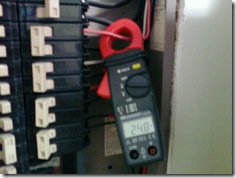
Hooking up to the fat red wire while the dryer is running shows a draw of about 24 amps @ 220 volts. I did a bit of poking around (Zzzztttt! Oucha!!.....Damn...!!!) and figured out that the dryer, when running on warm (verses hot or cold) uses about 20 amps for the heating element and about 4 amps for the motor. The motor runs continuously for about an hour per load. The heating element runs at about a 50% duty cycle for the hour that the dryer is running on medium heat.
Assume that we dry a handful of loads per week and that one load takes one hour. If the motor runs 4 hours/week and the heating element runs half the time, or two hours per week, we'll use about a dozen kWh per week, or about 600 kWh per year. That's about the same as 100 wall warts.
How about doing one less load of clothes in the dryer each week? You can still buy clothes lines at the hardware store - they are over in the corner by the rest of the End-of-Life merchandise, and each time that you don't use your clothes dryer, you'll save at least as much power as a wall wart will use for a whole year.
Lets do another quick check. Say that I have a small computer that I leave run 24 hours per day. Mine (an old SunBlade 150 that I use as a chat and file server) uses about 60 watts when powered up but not doing anything. That's about 1.4 kWh per day or about 500kWh per year, roughly the same as my clothes dryer example and roughly the same as 100 wall warts. Anyone with a gaming computer is probably using twice as much power. So how about swapping it out for a lower powered home server?
Notebooks, when idling with the screen off, seem to draw somewhere between 15 and 25 watts. (Or at least the three that I have here at home are in that range). That's about half of what a low-end PC draws and about the same as 25 wall warts. Using a notebook as your home server will save you (and the planet) far more than a handful of wall warts. And better yet, the difference between a dimly lit notebook screen and a brightly lit one is about 5 watts. Yep - that's right, dimming your screen saves more energy than unplugging a wall wart.
If it is warm, it is using power.
The warmer it is, the more power it uses. (Your laptop is warm when it is running and cold when it is shut off, right?). And if you can grab onto it without getting a hot hand, like you can do with a wall wart, (and like you can't do with an incandescent light bulb) it isn't using enough electricity to bother with.
Compare that to something interesting, like driving your car. According to the above NEF calculator and other sources, you'll use somewhere around a wal-wart-years worth of CO2 every few miles of driving. (NEF and Sightline show roughly 1kg of CO2 every two miles of driving). On my vacation this summer I drove 6000 miles and probably used something like 3000kg of CO2. That's about 700 wall-wart-year equivalents (+/- a couple hundred wwy's).
Take a look at a picture. (Or rather ... take a look at a cheezy Google chart with the axis labels in the wrong order....)
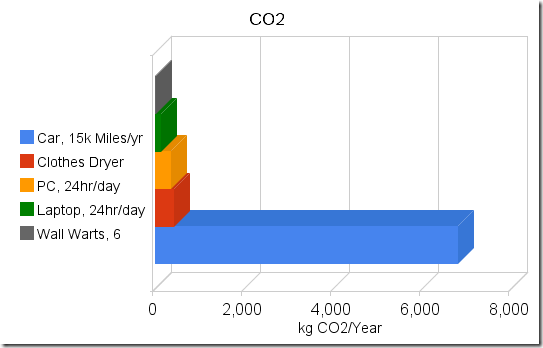 Can you see where the problem might be? (Hint - It's the long bright blue bar)
Obviously my numbers are nothing more than rough estimates. But they should be adequate to demonstrate that if you care about energy or CO2, wall warts are not the problem and unplugging them is not the solution.
You can do way better than that!
Disclaimer: No wall warts were harmed in the making of this blog post. Total energy consumed during the making of the post: 5 - 23 watt CFL bulbs for 2 hours = 230 watt-hours; 5 - 25 watt incandescent bulbs for 1/2 hour = 62.5 watt-hours; one 18 watt notebook computer for 3 hours = 54 watt-hours; one 23 watt notebook for 3 hours = 69 watt-hours; Total of 415 watt-hours, or 28.8 wall-wart-days. Any relationship between numbers in this blog post and equivalent numbers in the real world is coincidental. See packaging for details.

(09/29-2008 - Updated to correct minor grammatical errors. )
Let's try something unique. I’ll use actual data to see if we can save the planet by unplugging wall transformers.
Step one – Measure wall wart power utilization.
Remember that Volts x Amps = Watts, and Watts are what we care about. Your power company charges you for kilowatt-hours. (One thousand watts for one hour is a kWh).
 Start with one clamp-on AC ammeter, one line splitter with a 10x loop (the meter measures 10x actual current) and one wall wart (a standard Nokia charger for an N800).
And we have zero amps on the meter.
OK - That meter is made for measuring big things, so maybe I need a different meter.
Lesson one
Wall warts don't draw much current. They don't show up on the ammeters' scale even when amplified by a factor of 10.Try again - this time with an in-line multimeter with a 300mA range.

Children - don't try this at home - unless you are holding on to your kid brother and he is properly grounded to a water pipe.
(just kidding.....)
That's better. It looks like we have a couple milliamps current draw.
Try a few more. The ones I have (Motorola, Samsung, Nokia) are all pretty close to the same. Lets use a high estimate of 5mA @ 120v, or about a half of a watt.
Similarity, checking various other parasitic transformers, like notebook computer power bricks, yields currents in the low milliamp ranges. When converted to watts, the power draw for each brick is somewhere between one-half and two watts.
To make sure the numbers are rational and that I didn't make a major error somewhere, I did the simplest check of all. I placed my hand on the power bricks. When they are plugged into the wall and nothing is plugged into them, they are not warm. (Warm = watts).
One more sanity check. Plugging three notebook power supplies and three phone power supplies into a power strip shows about 30mA @ 120v for all six bricks, which is under 4 watts, or less than a watt each. My measurements are rough (I don't have a proper milliamp meter), but for estimates for a blog that nobody actually reads, they should be close enough.
So let's pretend that I want to save the planet, and that unplugging power bricks is the way I'm going to do it. I'll need to periodically plug them in to charge whatever they are supposed to charge. Let's assume they'll be plugged in for 4 hours per day and unplugged 20 hours per day. If I have a half dozen power bricks, I'll save around 5 watts x 20 hours = 100 watt-hours per day, or the amount of electricity that one bright light bulb uses in one hour. That would add up to 35kWh (Kilowatt-hours) per year. Not bad, right?
Until you put it into perspective.
Perspective
Let's take the other end of the home appliance spectrum. The clothes dryer (clothes tumbler to those on the damp side of the pond). That one is a bit harder to measure. The easiest way is to open up the circuit breaker box and locate the wires that go to the dryer.

Hooking up to the fat red wire while the dryer is running shows a draw of about 24 amps @ 220 volts. I did a bit of poking around (Zzzztttt! Oucha!!.....Damn...!!!) and figured out that the dryer, when running on warm (verses hot or cold) uses about 20 amps for the heating element and about 4 amps for the motor. The motor runs continuously for about an hour per load. The heating element runs at about a 50% duty cycle for the hour that the dryer is running on medium heat.
Assume that we dry a handful of loads per week and that one load takes one hour. If the motor runs 4 hours/week and the heating element runs half the time, or two hours per week, we'll use about a dozen kWh per week, or about 600 kWh per year. That's about the same as 100 wall warts.
How about doing one less load of clothes in the dryer each week? You can still buy clothes lines at the hardware store - they are over in the corner by the rest of the End-of-Life merchandise, and each time that you don't use your clothes dryer, you'll save at least as much power as a wall wart will use for a whole year.
Lets do another quick check. Say that I have a small computer that I leave run 24 hours per day. Mine (an old SunBlade 150 that I use as a chat and file server) uses about 60 watts when powered up but not doing anything. That's about 1.4 kWh per day or about 500kWh per year, roughly the same as my clothes dryer example and roughly the same as 100 wall warts. Anyone with a gaming computer is probably using twice as much power. So how about swapping it out for a lower powered home server?
Notebooks, when idling with the screen off, seem to draw somewhere between 15 and 25 watts. (Or at least the three that I have here at home are in that range). That's about half of what a low-end PC draws and about the same as 25 wall warts. Using a notebook as your home server will save you (and the planet) far more than a handful of wall warts. And better yet, the difference between a dimly lit notebook screen and a brightly lit one is about 5 watts. Yep - that's right, dimming your screen saves more energy than unplugging a wall wart.
Make this easier!
How about a quick and dirty way of figuring out what to turn off without spending a whole Sunday with ammeters and spreadsheets? It's not hard.If it is warm, it is using power.
The warmer it is, the more power it uses. (Your laptop is warm when it is running and cold when it is shut off, right?). And if you can grab onto it without getting a hot hand, like you can do with a wall wart, (and like you can't do with an incandescent light bulb) it isn't using enough electricity to bother with.
The CO2
So why do we care? Oh yeah - that global warming thing. Assuming that it's all about the CO2, we could throw a few more bits into the equation. Using the CO2 calculator at the National Energy Foundation in the UK and some random US Dept of Energy data, and converting wall warts to CO2 at a rate of 6kWh per wall wart per year and 1.5lbs of CO2 per kWh, it looks like you'll generate somewhere around 4kg of CO2 per year for each wall wart, +/- a kg or two, depending on how your electricity was generated.Compare that to something interesting, like driving your car. According to the above NEF calculator and other sources, you'll use somewhere around a wal-wart-years worth of CO2 every few miles of driving. (NEF and Sightline show roughly 1kg of CO2 every two miles of driving). On my vacation this summer I drove 6000 miles and probably used something like 3000kg of CO2. That's about 700 wall-wart-year equivalents (+/- a couple hundred wwy's).
Take a look at a picture. (Or rather ... take a look at a cheezy Google chart with the axis labels in the wrong order....)

Obviously my numbers are nothing more than rough estimates. But they should be adequate to demonstrate that if you care about energy or CO2, wall warts are not the problem and unplugging them is not the solution.
Should you unplug your wall warts?
You can do way better than that!
Disclaimer: No wall warts were harmed in the making of this blog post. Total energy consumed during the making of the post: 5 - 23 watt CFL bulbs for 2 hours = 230 watt-hours; 5 - 25 watt incandescent bulbs for 1/2 hour = 62.5 watt-hours; one 18 watt notebook computer for 3 hours = 54 watt-hours; one 23 watt notebook for 3 hours = 69 watt-hours; Total of 415 watt-hours, or 28.8 wall-wart-days. Any relationship between numbers in this blog post and equivalent numbers in the real world is coincidental. See packaging for details.
Subscribe to:
Posts (Atom)
-
Cargo Cult: …imitate the superficial exterior of a process or system without having any understanding of the underlying substance --Wikipe...
-
Structured system management is a concept that covers the fundamentals of building, securing, deploying, monitoring, logging, alerting, and...
-
In The Cloud - Outsourcing Moved up the Stack [1] I compared the outsourcing that we do routinely (wide area networks) with the outsourcing ...
